


Speechify – Text to Speech
4.010.12K Reviews
App Specs
- Version
- 5.54.7543
- Updated On
- License
- Free
- Downloads
- 10,000,000+
- Developer
- Speechify - Voice AI Assistant
- Categories
- Productivity
- Platform
- Android, iOS
Screenshots
 Analysis by AppCompare
I get the most out of a read-aloud app when I decide what job it should do before opening it. If I’m trying to clear a backlog of articles, I want a simple queue; if I’m studying, I need to pause, revisit a passage, and take notes. Speechify – Voice AI Assistant is most useful when listening is part of a deliberate routine, rather than a way to cram more noise into every spare moment.
Start with a listening plan, not a bigger reading list
Speechify is a productivity app from Speechify - Voice AI Assistant, built around turning written material into audio. That makes it a good fit for people who already have things they need to read but struggle to find uninterrupted time. I’d use it for a saved article on a walk, a document during a routine household task, or a long email when looking at a screen has become tiring.
It is less suitable when a task depends on visual layout, close comparison, or quick reference. Listening can make prose easier to fit into a day, but it doesn’t replace scanning a table, checking a diagram, or marking up a page. I still keep the original document open when accuracy and detail matter; audio is a useful route into the material, not a reason to stop checking it.
Make capture serve a real workflow
The app’s document support gives me a practical way to move reading out of a browser tab pile. Rather than adding every interesting link, I’d choose a small set of items with a clear purpose: a report to understand before a meeting, a chapter to review, or a few articles related to one project. That simple filter helps prevent a listening queue from becoming another guilt-inducing inbox.
A helpful habit is to decide what happens after listening. For a work document, I might pause to write down a decision or question; for an article, I might save one idea worth following up. Speechify can read the material, but the reader still has to organize what matters. I find that distinction important: audio can improve access and make a task easier to start, but it does not automatically turn listening into learning.
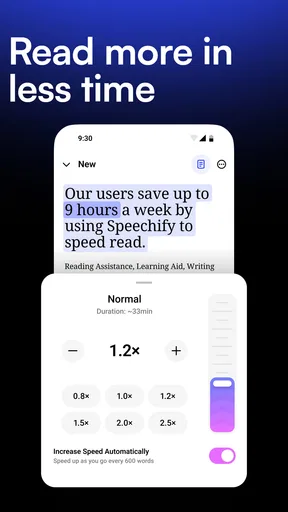
For dense material, I would not begin at a faster pace just to finish sooner. Starting at a comfortable speed makes it easier to notice whether names, technical terms, or sentence breaks are being handled clearly. Once I know the content is easy to follow, I can adjust the pace. That small test is more useful than choosing a speed based on how quickly I want the queue to disappear.
Build a repeatable routine across devices
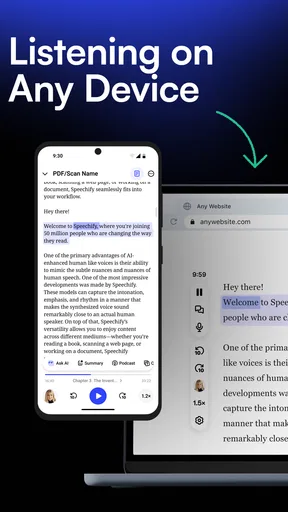
Cross-device syncing is handy if your day naturally moves between a phone and a computer or tablet. I’d use the phone for listening away from my desk, then return to a larger screen when I need to inspect the source or make notes. The key benefit is continuity: I don’t have to treat each listening session as a separate task or remember exactly where I stopped.
Worth Reading Before You Choose

EA SPORTS FC Mobile 26 Is a Bigger Football Game, but It Takes Time

Flipboard Shows What News Apps Must Do Beyond the Feed

Switching to Android Auto Means Rethinking Your Driving Routine

Google Calendar Makes a Crowded Week Easier to Manage

Ludo King Makes the Most of the Minutes Between Plans

Baby Panda World Brings Quick Play to Modern Phones, but Its Game Library Feels Busy
A realistic routine might be to choose one document at the end of the workday, listen to it during a walk the next morning, and jot down any follow-up once back at a desk. For a student, the same pattern could mean listening to assigned reading before opening the text to review key sections. Neither workflow asks the app to do everything; it gives listening a specific place in the day and leaves comprehension checks where they belong.
Know where listening can fall short
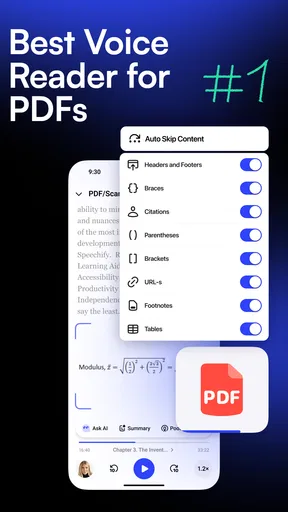
Text-to-speech is not equally helpful for every document. A clean article is usually easier to follow than a file with complicated formatting, footnotes, tables, or many unfamiliar abbreviations. The voice may sound natural, but pronunciation can still stumble on unusual words, and a sentence that looks clear on screen may be harder to understand when heard without its visual context.
That is why I would treat a first listen as a pass for orientation, especially with technical or important material. If a passage sounds odd, I’d check it in the document instead of assuming the narration got it right. Speechify can make written information more accessible, including for people with dyslexia or visual impairments, but individual needs vary; anyone relying on it for essential content should confirm that its reading style works for them.
It also won’t suit someone who needs a quiet, screen-free experience in every setting or who finds spoken words distracting. Listening while cooking worked for me with a familiar kind of article, but it would be a poor choice for a safety-critical task or a document that requires careful concentration. I’d rather match the tool to the moment than assume every spare minute is a listening opportunity.
Getting Started with Speechify
Jumping into Speechify is a breeze. Right off the bat, the app greets you with a clean, intuitive interface that's as welcoming as a warm cup of coffee on a chilly morning. After a quick and painless sign-up process, you're ready to unleash the power of text-to-speech at your fingertips.
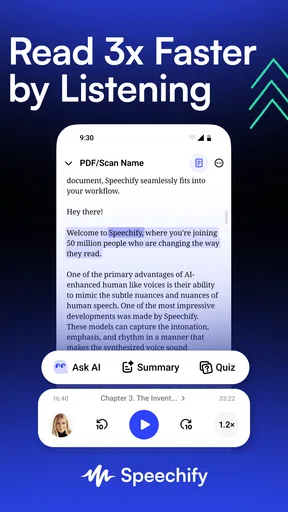
The app supports a wide array of documents, from PDFs and Word files to web pages and emails. Just upload your document, and Speechify will start narrating it in one of several available voices. And let me tell you, these aren’t your typical robotic voices. They’re smooth, natural, and pleasant to the ears.
Features That Stand Out
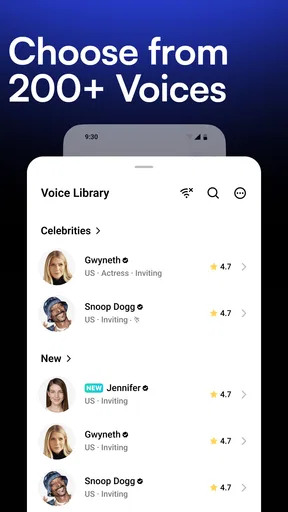
The customization options in Speechify are where the magic happens. You can adjust the reading speed to suit your pace – whether you’re a fast listener or prefer a leisurely tempo, Speechify has got you covered. Plus, the app lets you choose from a diverse selection of voices, ranging from warm and friendly to authoritative and crisp. It’s like having a personal narrator who knows exactly how you like your stories told.
Another feature that deserves a shoutout is the synchronizing ability. Speechify can sync across devices, which means you can start listening on your phone and pick up right where you left off on your tablet or computer. It’s seamless and perfect for on-the-go lifestyles.
Putting Speechify to the Test
So, how does it perform in real-world scenarios? I decided to put it through its paces by having it read a lengthy article while I was busy cooking dinner. As someone who often struggles to find time to catch up on reading, this was a game-changer. The app read the content smoothly and efficiently, never missing a beat even as I scrambled eggs and sautéed vegetables.
One thing to note is the app’s ability to handle complex documents. I tested it with a technical report filled with jargon and was impressed by its accuracy and pronunciation. Sure, there might be occasional hiccups with unusual words, but overall, it was spot-on.
Accessibility and Usability
Speechify isn’t just for multitaskers or those looking to maximize their productivity. It’s also a fantastic tool for individuals with dyslexia or visual impairments. The app empowers users by making written content accessible in audio format, which is a huge win for inclusivity.
The app’s design is user-friendly, and navigating through its features feels intuitive. You don’t need to be tech-savvy to get the most out of Speechify. It's as simple as upload, tap, and listen.
Choosing it over familiar alternatives
Compared with a device’s built-in read-aloud tools, Speechify’s appeal is having document listening, voice choice, speed adjustment, and syncing gathered in one place. Built-in options can be enough if you only need occasional narration and prefer not to add another app to your routine. A dedicated reader makes more sense when you regularly move between different kinds of text and want a consistent listening setup.
It is also different from a podcast app: the source is material you choose, not a stream of finished audio shows. That distinction is useful for assigned reading, work documents, or articles you have already saved. If what you really want is commentary, discussion, or entertainment made for listening, a podcast is the better format. Speechify helps you get through written material; it does not turn every document into a polished audio program.
For study, I would pair it with ordinary reading rather than replace it. Listen once to get the shape of a chapter, then revisit important sections visually and make notes. For proofreading, hearing your own writing read aloud can expose awkward phrasing, but a synthetic voice is not a substitute for careful editing. These are small but practical ways to use narration without asking it to do work it cannot do.
Cost, access, and a sensible trial
Speechify is free to install and is rated for Everyone. It has a four-point-zero average from around 268 thousand ratings, with about 9 thousand written reviews and over 10 million installs. Those figures suggest a widely used app, but I would still judge it by whether its voices, document handling, and pace suit my own reading habits.
There are in-app purchases, ranging from about 49 cents to around 140 dollars per item, so I would check the current options in the app before committing to anything. The free starting point makes it possible to see whether listening actually fits your day, but the presence of paid items means I would not assume every option is included. A sensible test is to try a few documents you genuinely need to read, not just sample a voice and decide based on novelty.
The Android version is listed as version 5.36.6563 and requires Android 9 or later. That is worth checking before installing on an older device. The app was released on August 16, 2021, and the developer is Speechify - Voice AI Assistant. These details matter less than the day-to-day fit, but the operating-system requirement can determine whether it is an option at all.
Final Thoughts
In a world where we're constantly juggling tasks, Speechify – Voice AI Assistant offers a refreshing breath of efficiency. The app is like having a personal narrator who’s always ready to dive into your reading list, freeing up your hands and eyes for other tasks. Whether you're a student, a professional, or someone who simply loves to consume content, Speechify is a valuable addition to your digital toolkit.
So, if you’re looking to transform the way you consume content, give Speechify a go. You might just find it’s the personal assistant you never knew you needed.
My recommendation is strongest for people who already have a steady stream of readable material and want a more flexible way to get through it. I would skip it if I rarely listen to text, depend heavily on visual structure, or prefer a basic built-in reader for occasional use. Used with a modest queue, a comfortable pace, and a quick visual check of anything important, Speechify can become a genuinely useful part of a sustainable reading routine rather than another app demanding attention.
Pros
- Easy to use interface for all ages.
- Supports multiple languages seamlessly.
- Adjustable reading speed options.
- Integrates with popular apps and services.
- High-quality
- natural-sounding voices.
Cons
- Limited features in free version.
- Requires internet for some functions.
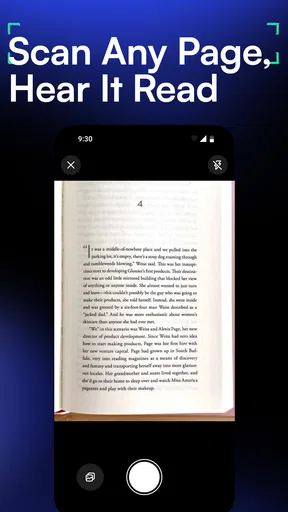
- Occasional glitches with text recognition.
- Voice customization options are minimal.
- Subscription can be expensive for some.
FAQs for Speechify – Text to Speech
What features does Speechify – Voice AI Assistant offer?
Speechify offers a wide range of features designed to enhance your reading experience. These include converting text to speech, a variety of natural-sounding voices, adjustable reading speeds, and the ability to import content from different sources like PDFs, web pages, and emails. It's a versatile tool for those looking to consume content audibly.
Is Speechify compatible with both Android and iOS devices?
Yes, Speechify is fully compatible with both Android and iOS platforms. This allows users to seamlessly use the app across different devices, ensuring that you can access your content whether you're at home or on the go. Regular updates ensure the app remains functional and user-friendly on all supported devices.
Can Speechify help individuals with reading disabilities?
Absolutely. Speechify is particularly beneficial for individuals with dyslexia, ADHD, or other reading difficulties. By converting text to speech, it makes reading more accessible and less daunting, allowing users to comprehend and retain information more effectively. It can be a valuable tool for both educational and personal development purposes.
What are some potential drawbacks of using Speechify?
While Speechify offers many benefits, there are some potential drawbacks. Users have noted occasional issues with voice recognition accuracy and the app’s premium features requiring a subscription. Additionally, users may experience some limitations in voice options and personalized settings without upgrading to the premium version.
How does Speechify handle user privacy and data security?
Speechify takes user privacy seriously, implementing robust measures to protect your data. The app ensures that any uploaded content is secure and not shared with third parties. However, it's always a good practice to review the app’s privacy policy and terms of service to fully understand how your data is managed.


